> pdf-archive.com · Document archiving · since 2010

Keep. Share.
For the long run.

Keep your documents over time and share them through permanent links and QR codes, on servers in France. A private archive, where your files stay in place and the links keep working.

  • archive.since2010
  • archive.locationFrance 100%
  • archive.formatPDF/A · ISO 19005
  • archive.free_tier1 GB 0 €
§ 01 The problem 4 cases on file

A document matters most on the day it is missing

You rarely think about your archive, until the day you have to find something, prove something or pass it on. That is the day PDF Archive makes the difference.

case 01

"Find me the 2021 invoice."

An audit, a dispute, a client asking. You find it in seconds, with the date it was filed, thanks to a search that reaches inside the content of your PDF files.

case 02

"That link has already expired."

Transfer services erase your files after a few days. On a paid tier, your links and QR codes stay online with no expiry imposed on you: the recipient opens them whenever they want.

case 03

"Which drive was that on again?"

Between the computer, a USB stick, an external drive and two clouds, your archive scatters and goes missing. Here everything sits in one place, filed and searchable, on servers in France.

case 04

"Will this end up on Google?"

No. Your documents are private from the moment they are uploaded: nobody else reaches them, and nothing is promoted anywhere. Even shared through a link, a document stays out of search engines, unless you ask for the opposite, share by share.

§ 02 Once you are inside Screen · the real one
Frame2048 × 1280 px
SourceDemonstration account
CapturedSep 4, 2026
Rev.I

What an archive looks like

The account area as it stands today, on a demonstration account. The documents are made up for the example; the screen itself is the real one.
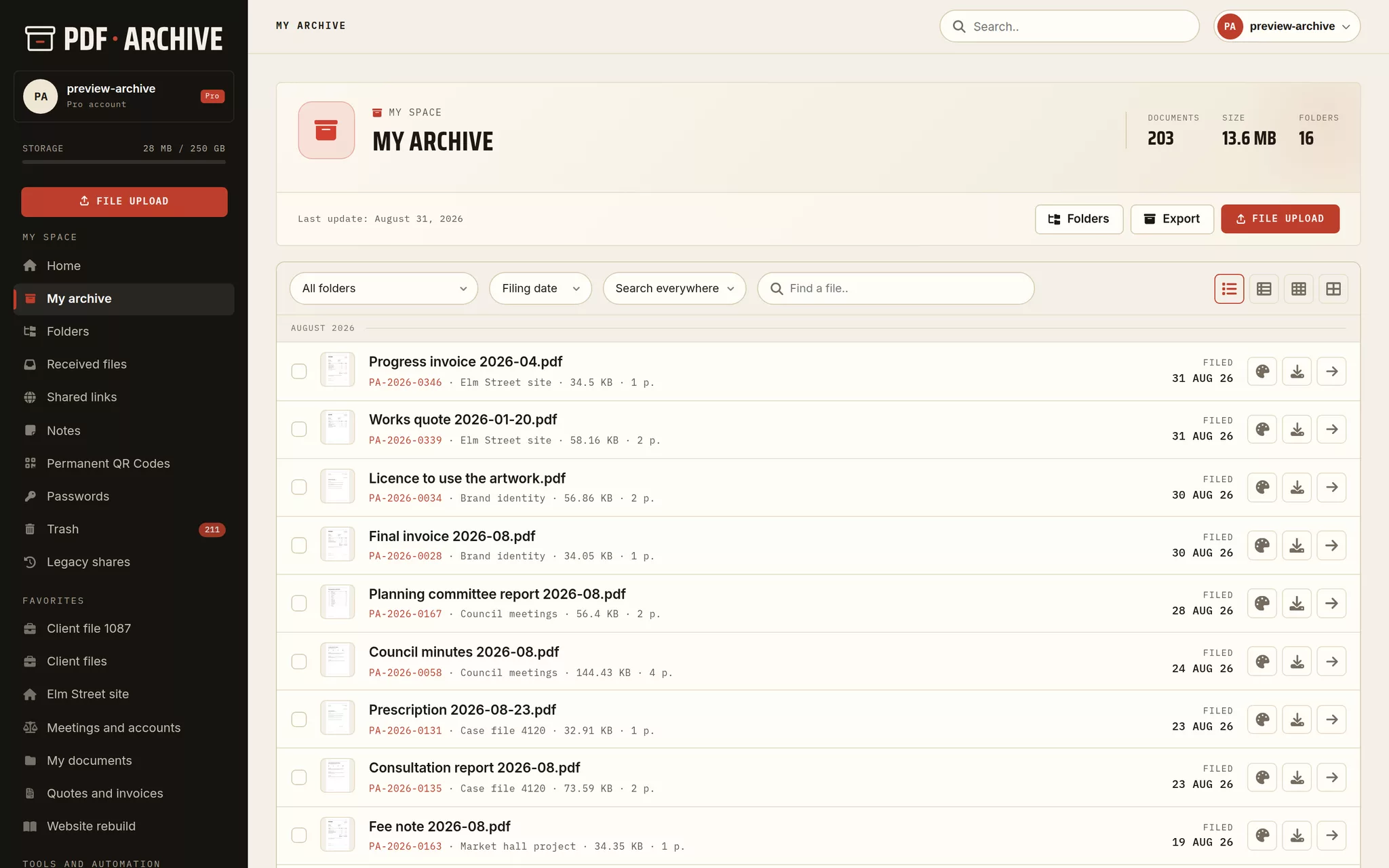
PDF file manager in list view: name, folder, size, page count and filing date of every archived document.
My archive · list viewThe filing date sits at the right of every line. Preview, download and share are on the line itself.
§ 03 Everything for your documents 08 entries

Much more than storage space

Built to keep, find and share your PDF files over time.

  1. 01

    Permanent archiving

    Your files kept and dated, reachable for as long as you want them. Nothing gets lost.

  2. 02

    Folders and organizing

    File by project, by year or by type. Instant search across your whole archive.

  3. 03

    Sharing you control

    A public link you put where you want it: on your site, in an email, on an intranet. Passwords, permanent QR codes, expiry if you want one.

  4. 04

    Encryption

    Applied on upload, on the server, for your most sensitive documents.

  5. 05

    Receiving files

    Take in documents through a single link: the sender needs no account.

  6. 06

    The PDF toolbox

    Convert, merge, split, optimize and encrypt your PDF files. These tools keep nothing: only the documents filed into your account are archived.

  7. 07

    Signature and stamp

    Sign and stamp your PDF files: your signature placed by drag and drop.

  8. 08

    The PDF/A standard

    Convert your PDF files to the PDF/A archiving format (ISO 19005), free of charge. Convert to PDF/A →

§ 05 A folder, in use Screen · the real one
Frame780 × 5976 px
SourceDemonstration account
CapturedSep 4, 2026
Rev.I

One financial year, in one place

The file of one client, read on a phone. A year of accounts in the order it was filed, each document carrying the date it was uploaded. Nothing is folded away on a small screen.

The client files of an accountancy firm, balance sheet and general ledger included, read on a phone.
The folder, on a phone

Scroll inside the screen

Client files · the 2025 accounts

  • Engagement letter 202624 Jul 26
  • Balance sheet 202518 Jul 26
  • Profit and loss account 202518 Jul 26
  • General ledger 202528 Jun 26
  • Certificate of compliance11 Jun 26
  • Tax return 202530 May 26
  • Fee note 2026-0508 May 26
  • Fee agreement15 Apr 26

Sixteen documents in the folder, eight of them the accounts of one year. The date on the right is the day the file was uploaded, and it is the one that holds: it is never rewritten by a later copy.

§ 06 How it works 03 steps

Three steps

From an empty account to a document shared through a link that will still open in ten years.

Step 1

Create your account

Free, in under a minute.

Step 2

Upload your files

Drag and drop, up to 8 GB per file on a paid tier.

Step 3

File and share

Folders, links, QR codes: you keep control.

§ 07 Sharing you control 05 link types

The link, and the shape you give it

One document, five ways to hand it over, and the same options behind each of them. You choose share by share, and nothing is decided once for the whole account.

Web reader

A reading page that fits the screen, with the document laid out for the web. You decide whether it can be downloaded.

Download page

A page showing the first page of the document and a download button. The plainest way to hand a file over.

Direct link Pro

The file opens straight in the browser, with no page around it.

Direct download Pro

The link starts the download at once, with nothing in between.

Full screen reader Pro

The document fills the screen, with its own toolbar and nothing else.

  • A password
  • An end date, from one hour to one year
  • Or no expiry at all
  • A download limit, single use included
  • A permanent QR code
  • Out of search engines by default
  • Revoked whenever you want
  • Anonymous view counts
§ 08 Pro Pro tier only

What the archive does without you

A web page captured on a fixed schedule, your documents reachable from your AI tools: two features that work without you opening the account area.

Scheduled web capture Pro

One address, one cadence: every day, every week or every month. The page is filed as a PDF in the folder you name, timestamped, and the versions stack up.

  • my-site.com/termsweekly
  • Sep 4, 2026capture 12
  • Aug 28, 2026capture 11
  • Aug 21, 2026capture 10
Scheduled capture

AI integration · MCP Pro

Connect one folder to Claude Code and to MCP-compatible assistants. They search, read and upload documents, with a token limited to the folder you choose.

  • searchin plain language
  • fetchtext and metadata
  • uploadfiled where you say
  • tokenrevoked in one click
AI integration
§ 09 Pricing Two tiers

Free, then Pro

Start for free. Upgrade to the Pro account for €19 a month, or €190 a year (two months free). One subscription for the whole account, whatever the number of documents. No commitment.

Free
0
for good
  • 1 GB · 1,000 files · PDF/PS/EPS
  • Links & QR codes
  • Encryption
Get started
Pro · Recommended
19 €/month
or €190 a year · two months free
  • Every format · up to 8 GB per file
  • Permanent links & QR codes · no time limit
  • Priority processing & support
See the Pro plan
§ 10 Frequently asked 8 questions

You may be wondering

Do you really keep my documents, or do they just pass through?
We keep them. That is the service.
A document you upload into your account stays there, in its place, until the day you delete it. You find it again months later in the same spot, with its name, its folder and its upload date. It is stored exactly as it arrived: what you download is what you uploaded.
The confusion often comes from the free tools, the ones that repair, convert or shrink a PDF with no account. Those keep nothing: the file is processed, the result is handed back to you, and nothing is added to an account. They are two separate uses of the same site.
On the space you get and what it includes, see the Pro account.
Is PDF Archive a storage space or a publishing service?
An archiving space, with sharing as an option.
The starting point is your documents, filed and kept for you. They are private by default: you are the only one who sees them, and they stay that way until you decide otherwise. The service files documents for their owner, and that is all it does.
Sharing comes afterwards, and only if you decide so, document by document. You open a link, you choose whether it carries a password and an end date, and you close it whenever you want. A shared document also stays invisible to search engines, unless you explicitly ask for the opposite, which the Pro account allows share by share.
In other words, the service works for you. What you upload becomes public only when you say so.
Is the free plan really free?
Yes. The free account is permanent: 1 GB of space and up to 1,000 files, with no bank card and no trial period. Your documents stay reachable as long as your account exists. The Pro account is optional: it opens more space, every file format and the advanced sharing options, monthly or yearly, with no commitment.
Is the price per document, or for my whole account?
For your whole account. There is nothing to pay per document.
You upload as many documents as your space holds, and the subscription does not change because you add one more. What counts is the space taken. The number of files and the number of shares are free, however large they get.
The details of the price and the space included are in the answer about the cost of the Pro account, and the free plan is described right next to it.
For how long is my document kept at that price?
For as long as you keep it. The subscription does not buy a hosting period.
You do not pay to keep a document for a period after which you would have to pay again for it to stay. You pay for an account, and as long as that account exists, what you archived in it stays there, in its place. An archived document has no end date and does not erase itself: it goes on the day you delete it, not before.
If the subscription stops, nothing is deleted either. The account goes back to the free plan and your documents stay reachable. The details are in the answer about what happens to your account when a Pro subscription expires.
One point not to confuse, because there are two separate actions. Archiving a document in your account is what this answer is about: it stays there. Uploading a file simply to get a sharing link, without archiving it, is something else: the file does not join your documents and you will not find it in your archive. Its fate follows that of the link. If you gave the share an end date, the file is deleted on that date. If you did not, it stays, and it takes up space without appearing among your documents. To keep a document, archive it.
Where is my data hosted?
Your documents are hosted in France, on servers located in mainland France. They are replicated in real time on two physically separate storage servers, and an additional backup is kept in another country of the European Union, to guard against any data loss. No document is transferred outside the European Union. Our few processors, payment and e-mail delivery, never have access to the content of your documents; they are listed, with the guarantees that frame their processing, in our privacy policy. If your activity requires a particular location or jurisdiction, contact technical support and tell us what you need.
Which file formats can I archive?
With a free account, you archive PDF, PostScript and EPS files. The Pro account accepts every format: images, office documents, presentations, archives, among others. Whatever the format, your document is kept exactly as you sent it, with no conversion and no change.
Do my recipients have to create an account to open a share?
No. A public share opens with a simple link, from any browser, with no account and no software to install. The link can also be turned into a QR code. If the document must not circulate freely, protect the share with a password and give it an end date: after that date, the link stops working.

Start archiving your documents
today.

Create a free account
FREU
HOSTED IN FRANCE
DATA IN THE EU
GDPR COMPLIANT
© 2026 PDF ARCHIVE · e.i. Valentin Beck · 67200 Strasbourg · hosted in France